A few years ago we moved from Nagios to Zabbix for our server monitoring needs. I wasn’t a big fan of Nagios, finding it a pain to manage with its myriad configuration files. It’s probably gotten better since I last toyed with it but since we moved to Zabbix I haven’t had much reason to look at Nagios again.
I also try to use SNMP monitoring for everything. SNMP is widely supported – all sorts of hardware has SNMP support, and with the net-snmp package you can pretty easily create your own SNMP-monitorable stuff on Linux. Since almost all of our stuff runs on Linux this has worked out pretty well, but our Exchange server is probably going to be running on Windows for the foreseeable future. Windows has SNMP support, it’s just not on by default. However, even when it’s enabled it doesn’t have the simple “dskPercent” monitoring I’ve come to know and love with net-snmp on Linux, which simply tells you how full a given disk is as a percent. This makes it easy to set alerts when a disk reaches 80% full.
On Windows I found these objects that can be used to get something similar:
[evan@monitoring02 14:41:24 ~]$ snmpwalk -v 2c -c community 192.168.1.20 | grep -i storage
HOST-RESOURCES-MIB::hrStorageIndex.1 = INTEGER: 1
HOST-RESOURCES-MIB::hrStorageIndex.2 = INTEGER: 2
HOST-RESOURCES-MIB::hrStorageIndex.3 = INTEGER: 3
HOST-RESOURCES-MIB::hrStorageIndex.4 = INTEGER: 4
HOST-RESOURCES-MIB::hrStorageIndex.5 = INTEGER: 5
HOST-RESOURCES-MIB::hrStorageIndex.6 = INTEGER: 6
HOST-RESOURCES-MIB::hrStorageType.1 = OID: HOST-RESOURCES-TYPES::hrStorageRemovableDisk
HOST-RESOURCES-MIB::hrStorageType.2 = OID: HOST-RESOURCES-TYPES::hrStorageFixedDisk
HOST-RESOURCES-MIB::hrStorageType.3 = OID: HOST-RESOURCES-TYPES::hrStorageCompactDisc
HOST-RESOURCES-MIB::hrStorageType.4 = OID: HOST-RESOURCES-TYPES::hrStorageFixedDisk
HOST-RESOURCES-MIB::hrStorageType.5 = OID: HOST-RESOURCES-TYPES::hrStorageVirtualMemory
HOST-RESOURCES-MIB::hrStorageType.6 = OID: HOST-RESOURCES-TYPES::hrStorageRam
HOST-RESOURCES-MIB::hrStorageDescr.1 = STRING: A:\
HOST-RESOURCES-MIB::hrStorageDescr.2 = STRING: C:\ Label:  Serial Number b78d19
HOST-RESOURCES-MIB::hrStorageDescr.3 = STRING: D:\ Label:EXCH201064  Serial Number xxxxxxxx
HOST-RESOURCES-MIB::hrStorageDescr.4 = STRING: E:\ Label:Exchange2010  Serial Number xxxxxxxx
HOST-RESOURCES-MIB::hrStorageDescr.5 = STRING: Virtual Memory
HOST-RESOURCES-MIB::hrStorageDescr.6 = STRING: Physical Memory
HOST-RESOURCES-MIB::hrStorageAllocationUnits.1 = INTEGER: 0 Bytes
HOST-RESOURCES-MIB::hrStorageAllocationUnits.2 = INTEGER: 4096 Bytes
HOST-RESOURCES-MIB::hrStorageAllocationUnits.3 = INTEGER: 2048 Bytes
HOST-RESOURCES-MIB::hrStorageAllocationUnits.4 = INTEGER: 4096 Bytes
HOST-RESOURCES-MIB::hrStorageAllocationUnits.5 = INTEGER: 65536 Bytes
HOST-RESOURCES-MIB::hrStorageAllocationUnits.6 = INTEGER: 65536 Bytes
HOST-RESOURCES-MIB::hrStorageSize.1 = INTEGER: 0
HOST-RESOURCES-MIB::hrStorageSize.2 = INTEGER: 10459647
HOST-RESOURCES-MIB::hrStorageSize.3 = INTEGER: 546570
HOST-RESOURCES-MIB::hrStorageSize.4 = INTEGER: 104824319
HOST-RESOURCES-MIB::hrStorageSize.5 = INTEGER: 393172
HOST-RESOURCES-MIB::hrStorageSize.6 = INTEGER: 196600
HOST-RESOURCES-MIB::hrStorageUsed.1 = INTEGER: 0
HOST-RESOURCES-MIB::hrStorageUsed.2 = INTEGER: 5885720
HOST-RESOURCES-MIB::hrStorageUsed.3 = INTEGER: 546570
HOST-RESOURCES-MIB::hrStorageUsed.4 = INTEGER: 44650892
HOST-RESOURCES-MIB::hrStorageUsed.5 = INTEGER: 166057
HOST-RESOURCES-MIB::hrStorageUsed.6 = INTEGER: 152902
I thought initially that the hrStorageUsed and hrStorageSize values were being reported in bytes, but according to this MSDN article, the units are reported in “allocation units,” which I assume are being reported under hrStorageAllocationUnits, so you just need to multiply the values by the allocation units.
In Zabbix, I check hrStorageUsed every 15 minutes as “disk_1_used”. I check hrStorageSize every 2 hours (since the actual size of the disk/partition isn’t likely to change that often) as “disk_1_size”. To calculate the percentage, I created a “Calculated” item with this formula:
100*(last("disk_1_used") / last("disk_1_size"))
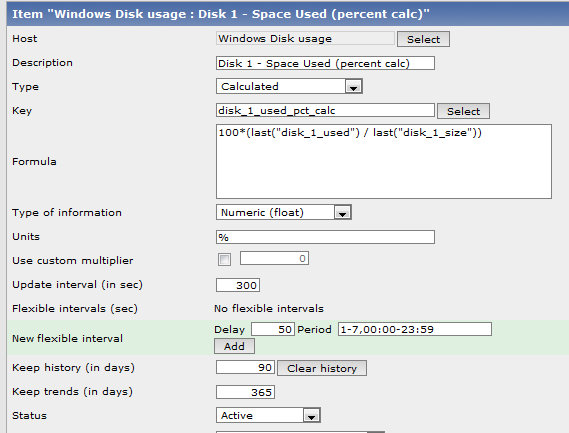
The values for disk_1_used and disk_1_size are in Storage Allocation Units, but since this is a percentage that doesn’t matter. However, I do also like to get an idea of the actual disk space being consumed; luckily this is also relatively easy to obtain in Zabbix using Calculated items. I monitor hrStorageAllocationUnits as “disk_1_allocunit” (every 7200 seconds since this too is unlikely to change much) and then the formula for the calculated used disk space is simply:
last("disk_1_used") * last("disk_1_allocunit")

Once all the work is done, here’s what the result looks like:

When I log in to the actual machine (my vCenter VM in this case) and check disk usage, the numbers match what Zabbix’s calculated values show, though Zabbix seems to be reporting values in “mebibytes” rather than “megabytes”:

I created a template in Zabbix which monitors these data for disks 1-5 and then applied it to all Windows servers; now I just need to apply some alert triggers and mission accomplished.


 Evan Hoffman's Blog
Leave a reply to Bob Cancel reply